Mawrid
Get Mawrid

For your phone and your browser

Wherever you are, a quiet return.

A printed mushaf to read and hear on your phone, with prayer times, the adhan, the qibla and adhkar beside it — and one ayah on every new tab in Chrome.

No account · No ads · No tracking · Works offline

Between one thing and the next

One ayah, set as it is printed.

Not a screenshot. Real Uthmani text from the King Fahd Complex edition, set in the printed-mushaf typeface, with a translation beneath it — the same view the Chrome extension opens on every new tab.

ٱلَّذِينَ ءَامَنُوا۟ وَتَطْمَئِنُّ قُلُوبُهُم بِذِكْرِ ٱللَّهِ ۗ أَلَا بِذِكْرِ ٱللَّهِ تَطْمَئِنُّ ٱلْقُلُوبُ

Those who have believed and whose hearts are assured by the remembrance of Allah. Unquestionably, by the remembrance of Allah hearts are assured.

Ar-Ra'd · 13:28 Saheeh International

Mawrid is a reminder between things. It is not a replacement for a mushaf, and it is not a teacher.

Mawrid on your phone

A mushaf you can read, hear and keep.

On Android and iPhone, Mawrid opens on the printed page — images of each print's own pages, turned from right to left — with recitation you can follow on the page. Around it: prayer times and the adhan, the qibla, adhkar, Quran radio and home-screen widgets.

  • Mawrid on Android: a page of the Madani mushaf with one ayah highlighted, and a toolbar offering Bookmark, Share, Translation, Tafseer and Recite.
    AndroidThe printed page
  • Mawrid on Android in night reading: the ayah being recited is tinted on the page, above a player bar with previous, pause, next and stop.
    AndroidRecitation you follow on the page
  • Mawrid on iPhone: the Saheeh International translation of an ayah in a panel over the mushaf page, with previous and next ayah buttons.
    iPhoneA translation, beside the page
  • Mawrid on Android, the prayer-times tab: today's prayer times as a timeline and a list, a countdown to the next prayer, an adhan switch on each prayer, and the Hijri date.
    AndroidPrayer times, adhan and qibla
  • Mawrid on iPhone, the Azkar tab: a morning dhikr in Arabic with its English meaning, a repeat count and its source.
    iPhoneAdhkar, each with its source
  • An Android home screen with Mawrid's Verse, Prayer times, Dhikr and Quran Radio widgets.
    AndroidOn the home screen

The printed mushaf

Choose a print — the King Fahd Complex's Madani 1440 or 1405, a colour-coded Tajweed print, Shemerly, Naskh, Qaloon or Warsh — shown as images of its printed pages.

  • Pages turn from right to left, as in print
  • Tap an ayah to bookmark it, share it, read its translation or Tafseer, or hear it
  • An index by surah, juz and rub' al-hizb, with bookmarks you can name
  • Night reading, a two-page spread on wide screens, and the page's surah, juz and hizb

Each print is a one-time download of about 80 to 235 MB, then reads offline. Qaloon and Warsh come with a note that the recitation and translations follow Hafs.

AndroidThe volume keys can turn the page.

Recitation

Verse-by-verse recitation from a wide choice of Hafs reciters. The ayah being recited is tinted on the page, and the pages turn with the reciter.

  • Recite a page, a single ayah, or a passage from one ayah to another
  • Repeat each ayah and the whole passage once, three times, ten times, a count you choose, or without end
  • Keeps playing in the background, with lock-screen controls
  • Download a page, a surah, a juz or a reciter's whole recitation, and listen offline

iPhoneAlso a playback speed from 0.75× to 1.5×, a repeat cycle and a mute switch.

Translation, Tafseer and search

  • Translations in English, French, Spanish, Indonesian and Turkish, each by its named translator
  • Tafseer in Arabic, from al-Muyassar and al-Sa'di to Ibn Kathir, al-Qurtubi and al-Tabari
  • Keep any translation or Tafseer on the phone to read offline
  • Search the Quran's text, with a surah filter
  • Share a passage as text, or as a light or dark image of up to 20 verses, in Arabic alone or with a translation

Prayer times, adhan and qibla

Monthly calendars from AlAdhan, with the calculation method, Asr calculation and minute adjustments you choose.

  • Set your place by city search, your current location, or coordinates
  • Today as a timeline, a countdown to the next prayer, and an adhan switch on each prayer
  • The whole month in a table, with Hijri and Gregorian dates
  • A qibla compass that tells you how far to turn
  • Adhan voices from AlAdhan, kept on the phone so the call needs no signal

AndroidThe full adhan sounds at the prayer time even with the app closed, with an optional full-screen alert. A volume key, or turning the phone face down, silences it.

iPhoneThe adhan arrives as notifications — its first half-minute, or the whole call in short parts — at notification volume. Open Mawrid now and then to keep it scheduled; with the app open, the full recording plays.

Adhkar and reminders

  • A tasbih counter
  • Morning, evening, after-prayer, bedtime and waking adhkar, each with its Arabic text, an English meaning, a count and its source
  • The complete Hisn al-Muslim, in Arabic, searchable by occasion
  • Optional dhikr reminders through the day, with quiet hours
  • Reminders for the Monday and Thursday fasts, the White Days, Ashura, Arafah, the first ten days of Dhul Hijjah, the last ten nights of Ramadan, and Friday

Quran radio

A Radio tab with the live station directory from mp3quran.net — reciters, narrations, translations, Tafseer, adhkar and ruqyah, lectures. Search it, keep favourites, and listen on in the background with lock-screen controls.

Home-screen widgets

Mawrid on your home screen, without opening the app.

AndroidResizable widgets for the Verse, Prayer times, Dhikr, Quran Radio and Recitation. The Verse widget sets the ayah in the mushaf face, changes daily or as often as hourly, and opens that ayah in the mushaf.

iPhoneVerse, Prayer times and Azkar widgets.

Arabic or English, and yours

  • Arabic or English, chosen in the app whatever your phone's language, with a full right-to-left layout
  • Western (123) or Arabic-Indic (١٢٣) numerals
  • Backgrounds drawn in the app — light, dark or following your phone — with favourites and a daily change
  • Back up to a file you choose and restore it; the format is shared with the Chrome extension

Private by default

No account, no ads, no analytics or crash reporting. Location is optional: it's asked for only when you use your current location or, on iPhone, the qibla compass — you can always pick a city or type coordinates instead.

Android and iPhone share almost everything. Where they differ — the adhan, the widgets, a few recitation controls — it's marked.

The day, from dawn to night

Your prayer horizon.

Today's prayer times, a live countdown to the next, and the Hijri and Gregorian dates — drawn as a horizon on the new tab, and as a timeline in the apps, beside the adhan and the qibla. You set your place once; the times are yours.

Prayer times

Near your location

— until —

  • Fajr—
  • Sunrise—
  • Dhuhr—
  • Asr—
  • Maghrib—
  • Isha—

These times are estimated from your time zone, for illustration on this page. In Mawrid you choose your place and calculation method, and the times come from AlAdhan. For prayer, follow your local mosque.

On the phone and in the toolbar

Quran radio, close at hand.

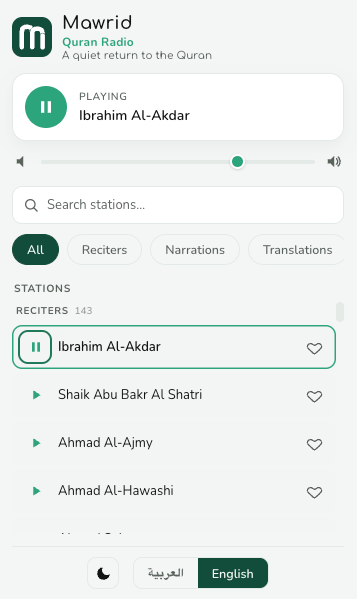
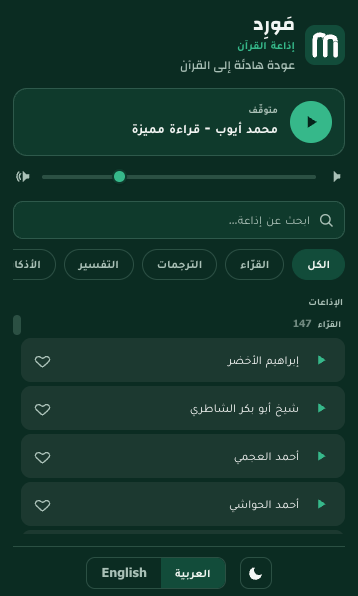
In the apps it has its own tab; in Chrome, click the Mawrid icon and a compact player opens. Live Quran stations from the mp3quran.net directory — recitations, Tafseer, adhkar, ruqyah and more. Choose a reciter, save your favourites, and it keeps playing while you do other things.

The Mawrid Quran radio popup in Chrome: a player, search, category chips, and a grouped list of stations. The Mawrid Quran radio popup in Chrome, in Arabic and dark mode, playing a reciter station.
  • Live stationsReciters and topic channels, searchable and grouped by category.
  • Keeps playingAudio carries on after the popup closes, and on the phone in the background, with lock-screen controls.
  • Your favouritesStar the stations you return to; they stay on this device.

Nothing here is watching

What leaves your device, and why.

Muslim apps have a history with location data. So we don't ask you to trust us — we show you the boundary, and you can check every word of it yourself.

In Chrome: the permissions it requests.

The complete list the extension requests — and why each one exists.

  • storageKeep your settings and saved ayahs on this device.
  • alarmsTick once a minute to check whether it's time for the adhan.
  • offscreenPlay the adhan and Quran-radio audio.
  • clipboardWriteCopy an ayah when you press copy.
  • notificationsShow the optional adhkar reminder.

On the phone: every permission, and why.

The complete list for each app, and what each one is for.

Android

  • POST_NOTIFICATIONSThe adhan, your reminders, and playback and download progress.
  • SCHEDULE_EXACT_ALARMUSE_EXACT_ALARMCall the adhan on the minute.
  • RECEIVE_BOOT_COMPLETEDWAKE_LOCKSet the adhan again after a restart, and keep it sounding to the end.
  • USE_FULL_SCREEN_INTENTThe optional full-screen adhan alert. You can switch it off.
  • FOREGROUND_SERVICEFOREGROUND_SERVICE_MEDIA_PLAYBACKFOREGROUND_SERVICE_DATA_SYNCKeep recitation, radio and the adhan playing, and downloads running, after you leave the app.
  • ACCESS_COARSE_LOCATIONApproximate location, asked for only when you tap “Use my current location”.
  • INTERNETACCESS_NETWORK_STATEFetch text, times and audio, and notice when the connection returns.

iPhone and iPad

  • NotificationsThe adhan, and your event and dhikr reminders — scheduled on the phone itself.
  • Location · While UsingFor “Use my current location”, and for true north in the qibla compass.
  • Background audioRecitation and radio keep playing when you leave the app.

What the extension never asks for

  • Your browsing history — unless you turn on Most visited
  • The pages you visit
  • Your identity or an account
  • Precise GPS location
  • Contacts, camera, microphone
  • Any third-party analytics

The one exception is Most visited, which asks for Chrome’s top-sites list when you switch it on and gives the permission back when you switch it off. Confirm all of it at chrome://extensions → Details, before or after installing.

What the apps never ask for

  • Contacts, camera, microphone
  • Your location in the background
  • An account or a sign-in
  • Permission to track you across apps
  • Analytics, ads or crash reporting

Check it on Android under Settings → Apps → Mawrid → Permissions, and on iPhone under Settings → Mawrid.

The honest boundary

We won't claim nothing ever leaves your device — that wouldn't be true. For prayer times, your place goes to AlAdhan: as city and country, or, in the apps, as coordinates when you pick a city from search or use your location. Recitation streams from EveryAyah and Quran.com, the printed pages download from Quran.com's app servers, and radio streams from each station's broadcaster. Feedback goes through FormSubmit, and only when you press Send. Those requests carry an IP address, as any web request does. Everything else — your settings, bookmarks, saved ayahs and dhikr count — stays on your device, and in your phone's own backup if you use one.

In Chrome — allowed to connect to, and nothing else: api.quran.com api.aladhan.com geocoding-api.open-meteo.com www.mp3quran.net everyayah.com verses.quran.com mirrors.quranicaudio.com cdn.aladhan.com backup.qurango.net stream.radiojar.com
In the apps — the hosts they contact, and nothing else: api.quran.com everyayah.com verses.quran.com mirrors.quranicaudio.com android.quran.com files.quran.app api.aladhan.com cdn.aladhan.com geocoding-api.open-meteo.com www.mp3quran.net backup.qurango.net stream.radiojar.com formsubmit.co formsubmit.co only when you send feedback. Tapping “Use my current location” also asks your phone’s own geocoder (Google or Apple) to name the place.

This page, too

The page you're reading sets no cookies and loads nothing from any other server — until you play a recitation, which streams from EveryAyah, the same source the apps and the extension use. The fonts are self-hosted, and your local prayer times were computed in your browser. Open the network tab and see.

Where the words come from

Named sources, not claims of authority.

Mawrid makes no religious claim of its own. It shows you the text, and tells you exactly where each part of it comes from.

The Arabic
QPC Hafs — the Uthmani text of the King Fahd Glorious Quran Printing Complex, served by the Quran.com API and set in the KFGQPC HAFS Uthmanic Script.
Printed pages
In the apps, each print's own page images — the King Fahd Complex's Madani prints, Tajweed, Shemerly, Naskh, Qaloon and Warsh — downloaded from Quran.com's app servers.
Translations
English (Saheeh International, Pickthall, Yusuf Ali), French (Hamidullah), Spanish (Isa García), Indonesian (the Indonesian Islamic Affairs Ministry) and Turkish (Diyanet), each named in the app.
Tafseer
Arabic works — al-Muyassar, Ibn Kathir, al-Sa'di, al-Qurtubi, al-Baghawi, al-Waseet and al-Tabari — shown on request.
Recitation
Verse-by-verse Hafs reciters, each named, streamed from EveryAyah and Quran.com.
Adhkar
Sets checked by hand, each dhikr naming its source — al-Bukhari, Muslim, Abu Dawud, at-Tirmidhi, an-Nasa'i or the Quran — and Hisn al-Muslim, compiled by Sa'id ibn Ali al-Qahtani.
Quran radio
Station directory from the mp3quran.net API; the live streams come from their broadcasters.
Prayer times
Computed by AlAdhan for your place, with the calculation method and Asr calculation you choose.
Adhan audio
Recordings from AlAdhan, each listed by name.
Place search
City search by Open-Meteo's geocoding API; the name of your current location from your phone's own geocoder.

The Chrome extension

One ayah on every new tab.

The ayah at the centre, and everything around it set the way you like.

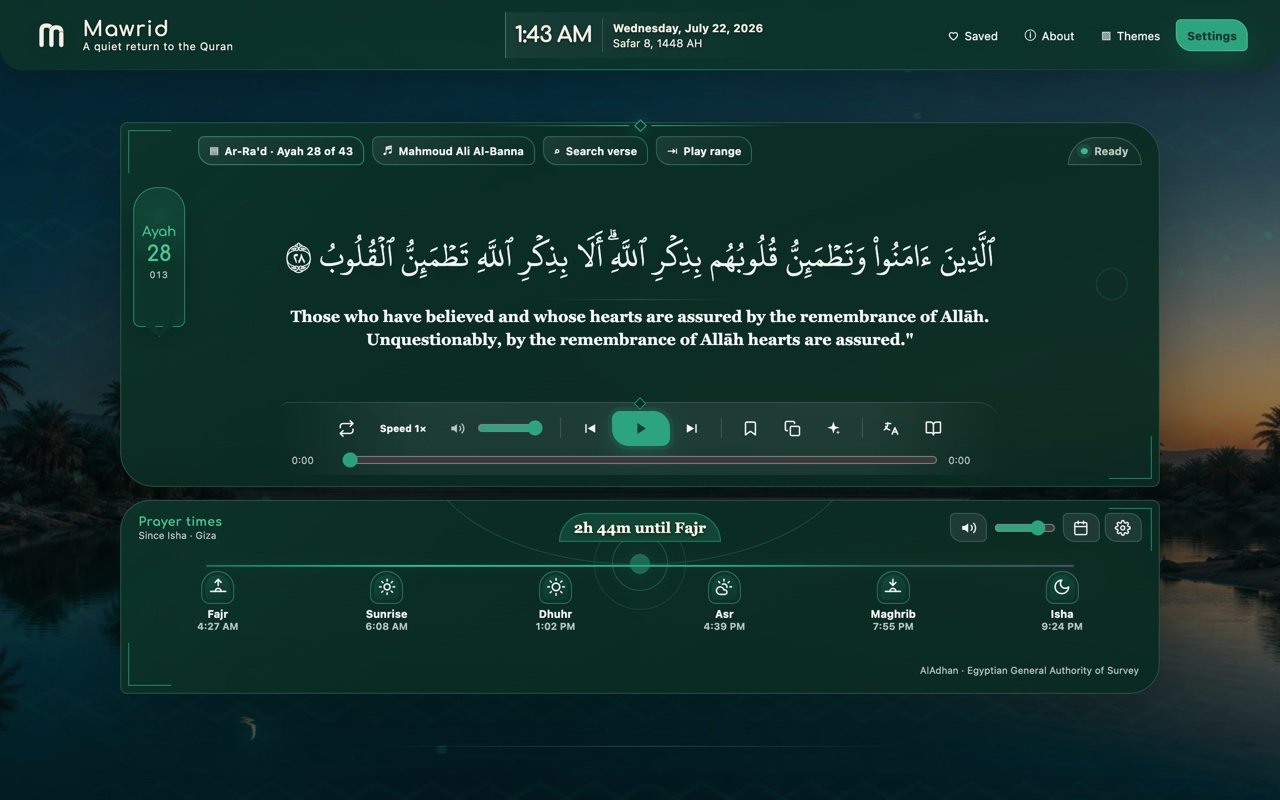
The Mawrid new tab at night: an ayah in Uthmani script with an English translation, a recitation player, and a row of prayer times over an oasis at blue hour.
The new tab at night, over the bundled oasis background.
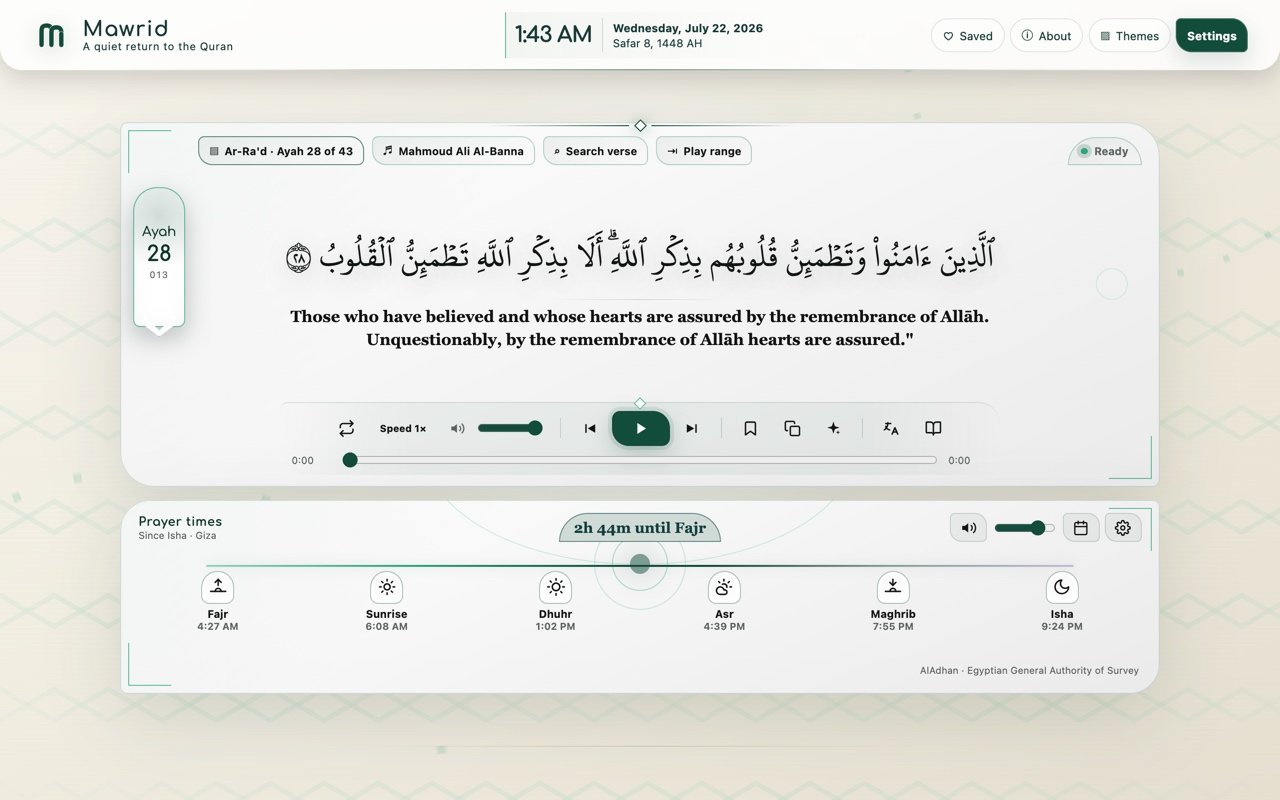
The same tab in light theme, on a soft geometric background.
Light theme.
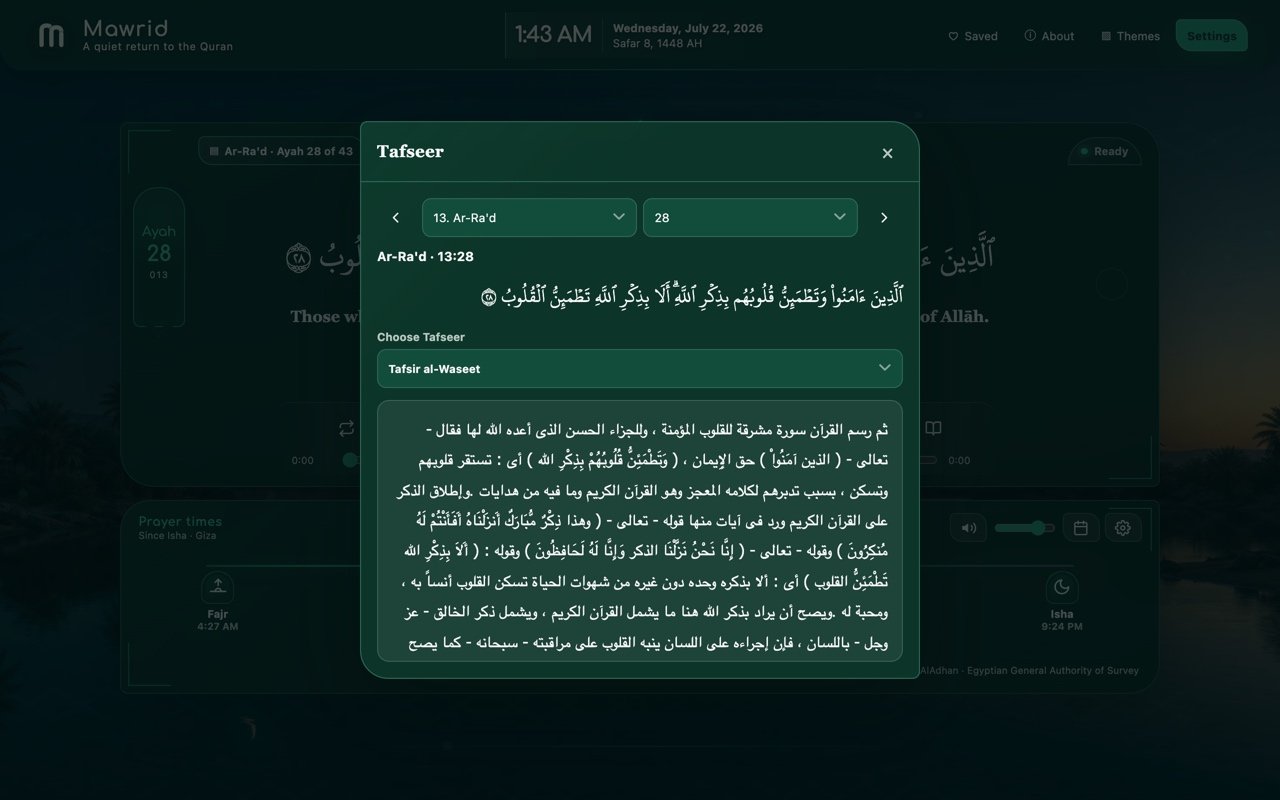
A Tafseer panel open beside a verse, its prose set in a Naskh typeface.
Tafseer, on request.
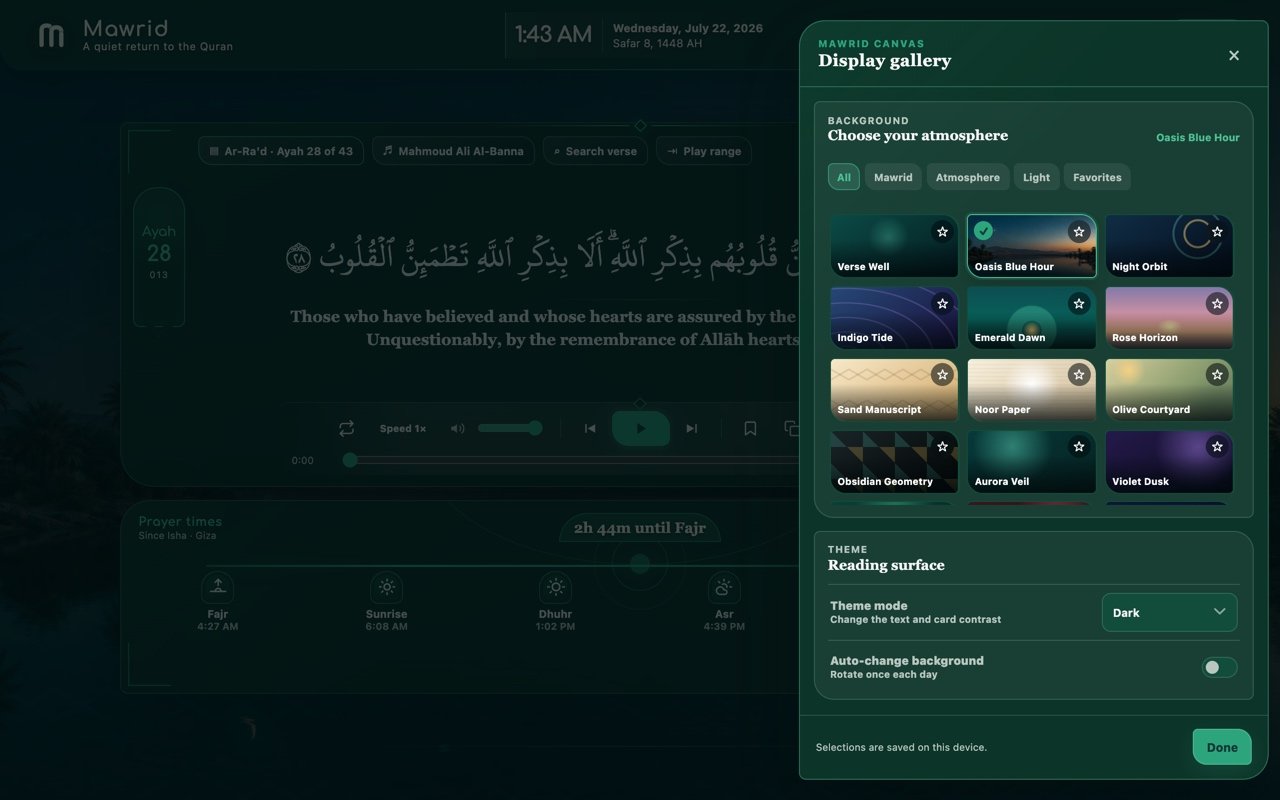
The display gallery of background choices with favourites.
A gallery of backgrounds.
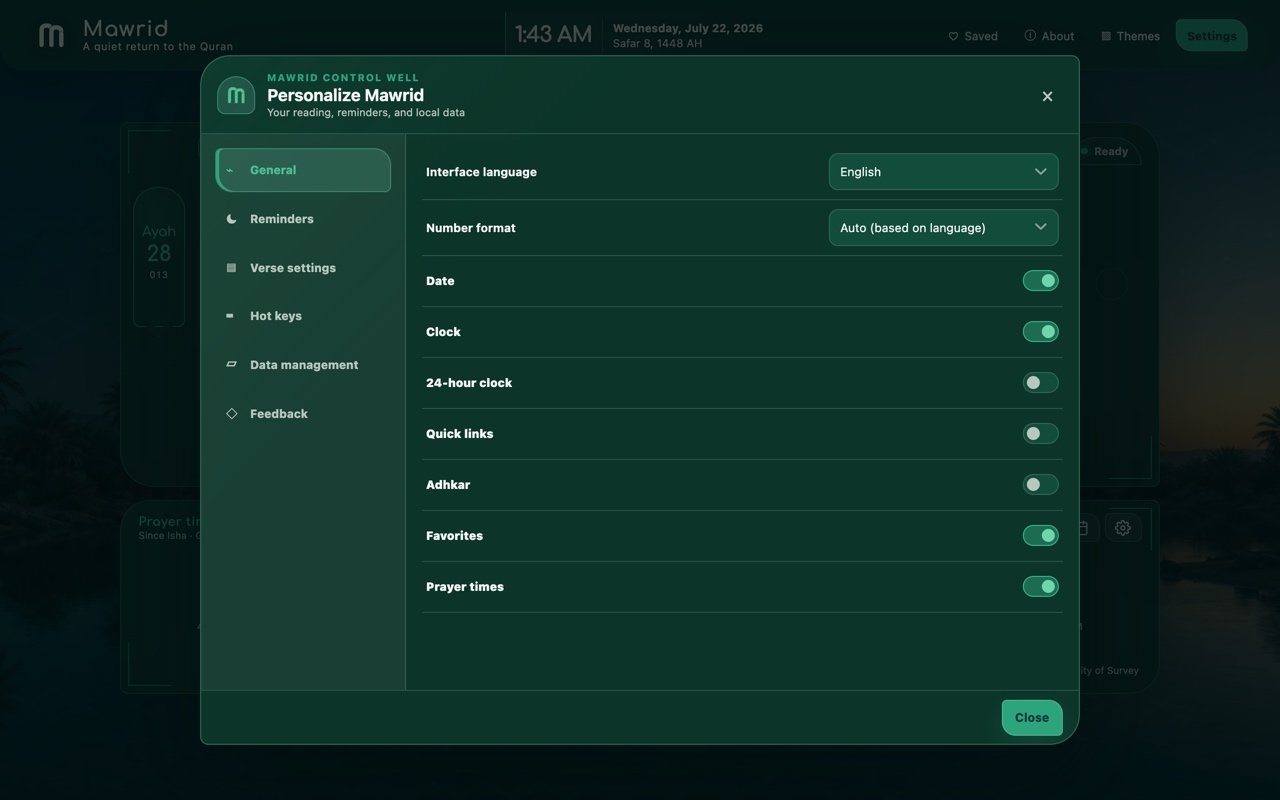
The Settings Well, with General, Reminders, Verse, Hot Keys and Data sections.
The settings panel.

Everything the extension does

The whole of it, plainly.

The ayah

  • Daily, random, or resume-your-last modes
  • The Uthmani QPC Hafs text
  • Translations in English, French, Spanish, Indonesian and Turkish
  • Optional transliteration
  • Arabic Tafseer works, each named
  • Copy or download a verse range as text or a themed image
  • Saved ayahs, with local search

Recitation

  • Verse-by-verse reciters
  • Play, pause, seek, previous, next
  • Repeat, speed and volume
  • Continuous next-ayah progression
  • Search the Quran by text, with a surah filter

Quran radio

  • Live Quran stations, one click from the toolbar
  • Reciters, Tafseer, adhkar, ruqyah and more, grouped by category
  • Search stations and save your favourites
  • Keeps playing after the popup closes
  • English and Arabic, light or dark

Prayer & time

  • Today's prayer times with a live countdown
  • Monthly prayer calendar
  • Calculation method and Shafi / Hanafi Asr
  • DST and per-prayer minute adjustments
  • Full adhan, short reminder, or off
  • Gregorian and Hijri dates together

Yours

  • A gallery of backgrounds; dark, light or system
  • English or Arabic interface, with full RTL
  • A dhikr counter and private quick links
  • Local JSON backup and restore
  • Keyboard navigation and reduced-motion support
  • An offline fallback using your last saved ayah

And what Mawrid doesn't do

No memorisation tracking. No tajweed grading. No streaks, points or leaderboards. No community feed. No accounts. No desktop app yet.

Get Mawrid

On Chrome and Android today. iPhone is next.

The extension is on the Chrome Web Store and works in every Chromium browser. The Android app is on Google Play. The iPhone and iPad app is built and on its way to the App Store — leave an email and we'll write to you once, when it's there. The same goes for the other platforms. Nothing else, ever.

Mobile app

Browser extension

Chrome Available now

Desktop app

One email, for that one platform. No list, no newsletter, no sharing.

Who made this

Who made this

I built Mawrid for myself first — a small, quiet way to meet an ayah in the gaps of an ordinary day, without an account, and without anything asking for my attention in return.

It stays free because there is no server to pay for and no data to sell. If you find any error in the text or a translation, tell me and I'll fix it that week — for a Quran, that matters more than anything else here.

A few honest answers

A few honest answers

Is my city or location stored anywhere?
On your device, so Mawrid doesn't have to ask again. It's sent to AlAdhan to compute your times — as city and country, or in the apps as coordinates when you pick a city from search or use your location. Tapping “Use my current location” also asks your phone's own geocoder (Google or Apple) for the place's name. Your phone's own system backup — Android's, or iCloud on iPhone — can include your settings, place included. It goes nowhere else.
Does it work offline?
Largely, once you've downloaded what you need. In the apps, each printed mushaf is a one-time download and then reads offline; recitation can be saved by page, surah, juz or whole reciter; translations and Tafseer can be kept too; and the adhan plays from a voice stored on the phone. In Chrome, your last ayah and settings are kept locally, so a new tab still opens. Search and radio need a connection.
What happens to my data if I uninstall?
It's removed with the app or the extension. Mawrid keeps no copy anywhere else, because it has nowhere else to keep one. Your phone's own system backup may still hold the app's settings, under your account. You can also export a backup file first.
Does the adhan work the same on iPhone and Android?
Not quite — the two systems allow different things. On Android the full adhan sounds from an alarm at the prayer time, even with the app closed, and can show a full-screen alert. On iPhone the call arrives as notifications, at your notification volume: either its first half-minute, scheduled about twelve days ahead, or the whole adhan in short parts, scheduled about a day ahead — so open Mawrid now and then to keep it coming. With the app open, or when you tap the notification, the full recording plays.
Which prayer calculation methods are supported?
The standard ones — Muslim World League, ISNA, Egyptian, Umm al-Qura, Karachi and more — with a Shafi or Hanafi Asr. Choose the one your local mosque uses.
Is it really free? How?
Yes. There is no server and no analytics, so running it costs almost nothing, and there's nothing to monetise.
Is there an iPhone app? Or Firefox?
The iPhone and iPad app is built and on its way to the App Store; leave your email above and you'll hear once, when it's there. The Android app is on Google Play now. Firefox, Edge, Opera and desktop apps aren't ready yet — and we'd rather say so plainly than pretend.